> ## Documentation Index
> Fetch the complete documentation index at: https://docs.rebelfi.io/docs/llms.txt
> Use this file to discover all available pages before exploring further.
# Dashboard
> Manage wallets, allocations, reporting, and settings from the RebelFi dashboard
The RebelFi dashboard is your central hub for managing yield operations. Use it to configure wallet profiles and API keys, monitor allocations, review transaction history, and manually test flows before scaling up to API/SDK automation.
 ## Overview
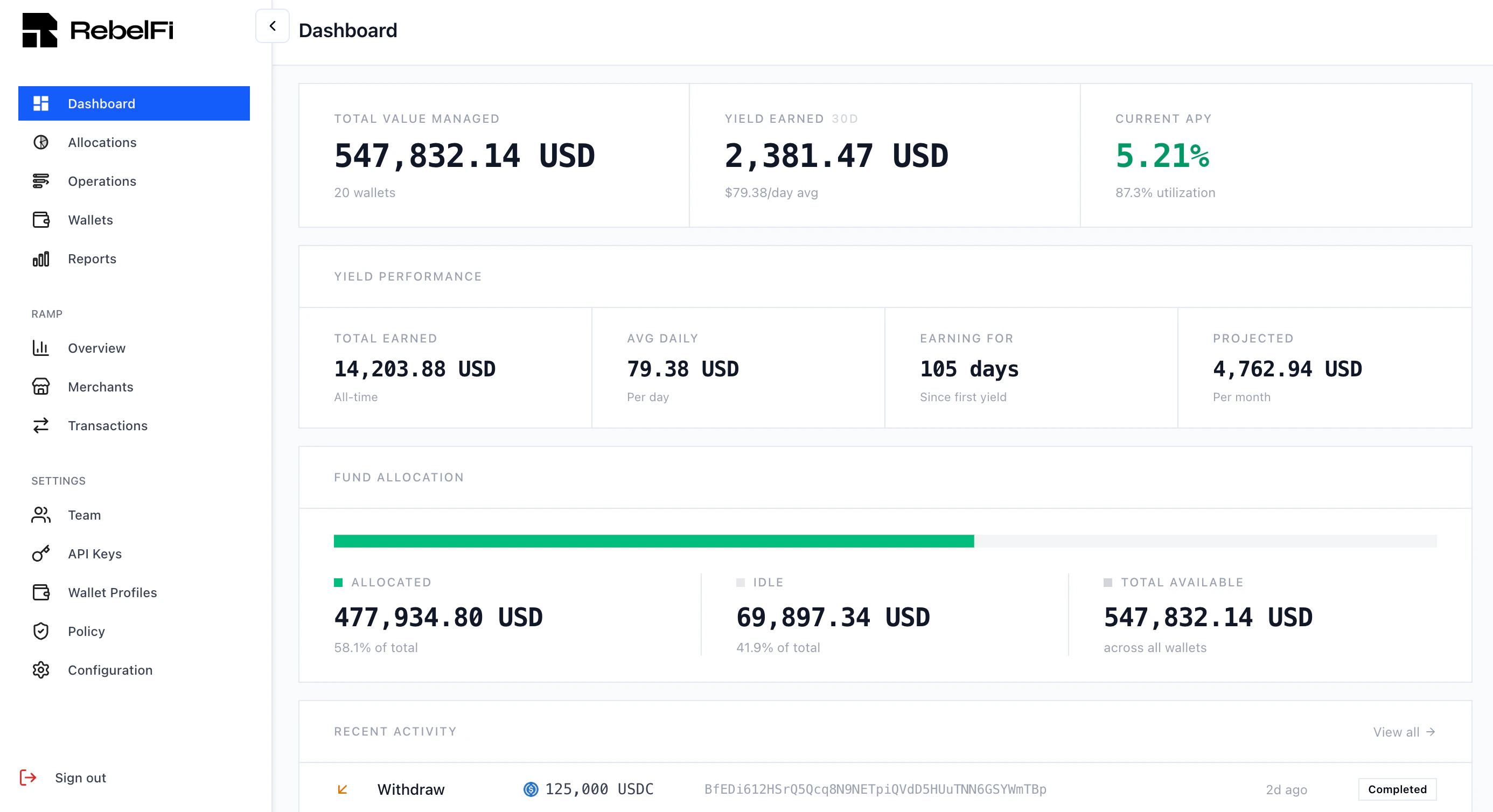
The dashboard home screen shows a real-time summary of your organization:
* **Total Value Managed** — aggregate value across all wallets
* **Yield Earned** — earnings over the last 30 days
* **Current APY** — portfolio-weighted average yield
* **Fund Allocation** — breakdown of allocated vs. idle capital
* **Recent Activity** — latest operations and their statuses
## Manual Allocations
You can connect a browser wallet (MetaMask, Phantom, etc.) directly to the dashboard to perform supply and unwind operations manually. This is useful for:
* Testing flows before building API/SDK automation
* One-off treasury operations
* Verifying strategy behavior on a new chain or protocol
Click **Connect Wallet** in the top right, then navigate to **Allocations** to supply or unwind from any available strategy.
## Overview
The dashboard home screen shows a real-time summary of your organization:
* **Total Value Managed** — aggregate value across all wallets
* **Yield Earned** — earnings over the last 30 days
* **Current APY** — portfolio-weighted average yield
* **Fund Allocation** — breakdown of allocated vs. idle capital
* **Recent Activity** — latest operations and their statuses
## Manual Allocations
You can connect a browser wallet (MetaMask, Phantom, etc.) directly to the dashboard to perform supply and unwind operations manually. This is useful for:
* Testing flows before building API/SDK automation
* One-off treasury operations
* Verifying strategy behavior on a new chain or protocol
Click **Connect Wallet** in the top right, then navigate to **Allocations** to supply or unwind from any available strategy.
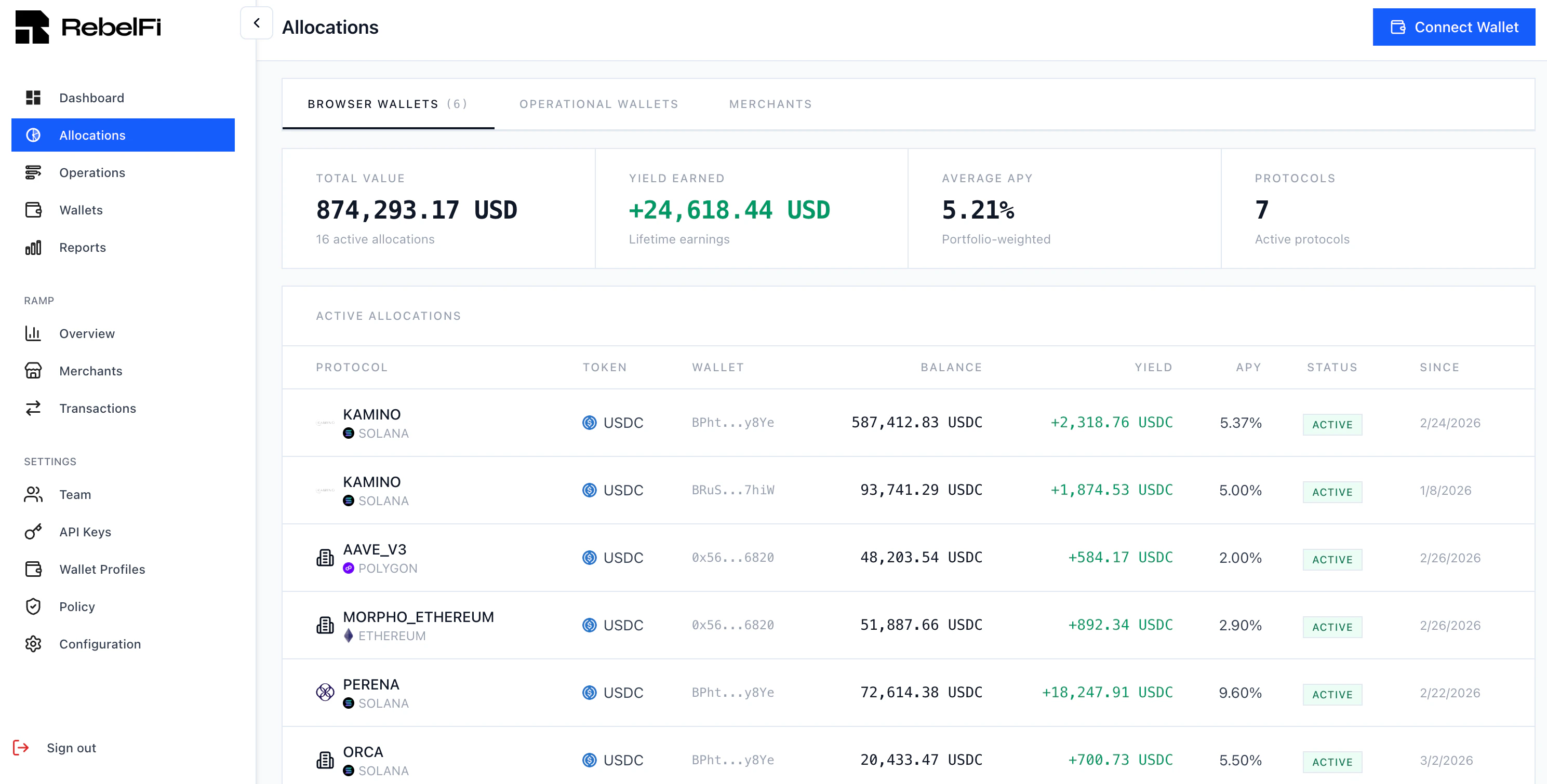 The Allocations page shows all active positions grouped by wallet type (browser wallets, operational/SDK wallets, recipient wallets). For each allocation you can see:
| Column | Description |
| ------------ | --------------------------------- |
| **Protocol** | The DeFi protocol and blockchain |
| **Token** | The stablecoin deployed |
| **Balance** | Current position value |
| **Yield** | Earnings accrued on this position |
| **APY** | Current annual percentage yield |
| **Status** | Active, pending, or unwinding |
| **Since** | When the allocation was created |
## Reporting
The **Reports** page provides a full transaction history with filtering by date range, transaction type, and asset.
The Allocations page shows all active positions grouped by wallet type (browser wallets, operational/SDK wallets, recipient wallets). For each allocation you can see:
| Column | Description |
| ------------ | --------------------------------- |
| **Protocol** | The DeFi protocol and blockchain |
| **Token** | The stablecoin deployed |
| **Balance** | Current position value |
| **Yield** | Earnings accrued on this position |
| **APY** | Current annual percentage yield |
| **Status** | Active, pending, or unwinding |
| **Since** | When the allocation was created |
## Reporting
The **Reports** page provides a full transaction history with filtering by date range, transaction type, and asset.
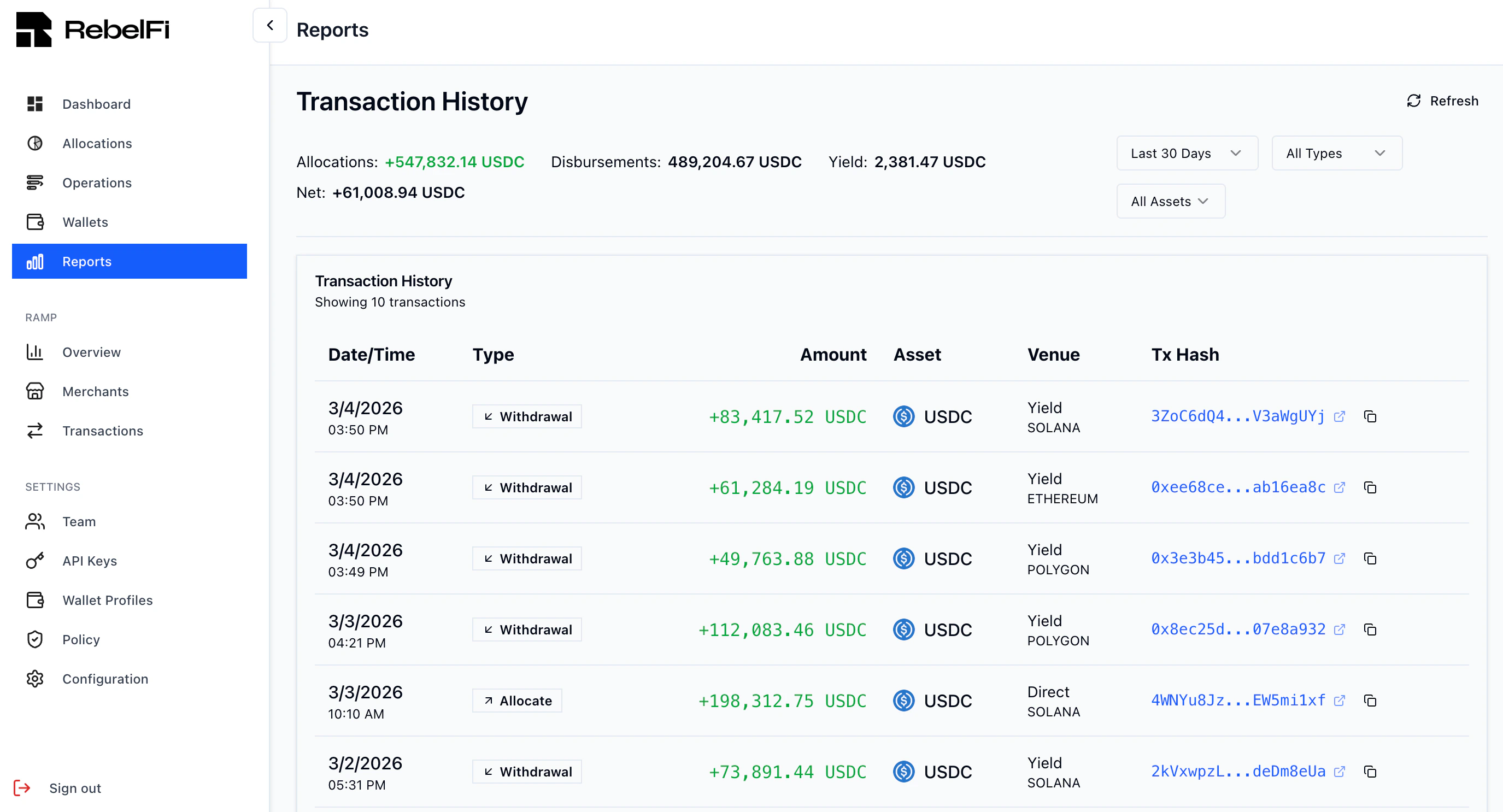 Each entry shows the date, type (Allocate, Withdrawal, Yield), amount, asset, venue, and on-chain transaction hash with a link to the block explorer. Use the summary bar at the top to see net flows across allocations, disbursements, and yield for the selected period.
## Settings
### Wallet Profiles
Go to **Settings → Wallet Profiles** to create and manage profiles. A Wallet Profile groups SDK-managed wallets with shared configuration: enabled blockchains, operation timeout, and gas sponsorship settings. You must create a profile before generating an API key.
See [Wallet Profiles](/guides/wallet-profiles) for full details.
### API Keys
Go to **Settings → API Keys** to generate keys. Each key is linked to a Wallet Profile and can only manage wallets within that profile.
See [Authentication](/guides/authentication) for key management best practices.
### Policy
The **Policy** page lets you configure operational guardrails — for example, maximum allocation amounts, allowed strategies, or approval requirements.
## Next Steps
Deploy your first allocation
Configure chains, timeouts, and gas sponsorship
Test in our sandbox environment
Automate operations with the TypeScript SDK
Each entry shows the date, type (Allocate, Withdrawal, Yield), amount, asset, venue, and on-chain transaction hash with a link to the block explorer. Use the summary bar at the top to see net flows across allocations, disbursements, and yield for the selected period.
## Settings
### Wallet Profiles
Go to **Settings → Wallet Profiles** to create and manage profiles. A Wallet Profile groups SDK-managed wallets with shared configuration: enabled blockchains, operation timeout, and gas sponsorship settings. You must create a profile before generating an API key.
See [Wallet Profiles](/guides/wallet-profiles) for full details.
### API Keys
Go to **Settings → API Keys** to generate keys. Each key is linked to a Wallet Profile and can only manage wallets within that profile.
See [Authentication](/guides/authentication) for key management best practices.
### Policy
The **Policy** page lets you configure operational guardrails — for example, maximum allocation amounts, allowed strategies, or approval requirements.
## Next Steps
Deploy your first allocation
Configure chains, timeouts, and gas sponsorship
Test in our sandbox environment
Automate operations with the TypeScript SDK